Improve user experience and SEO by optimising your website's load speed. Learn how to measure it now.

While patience is a virtue, it's not something users are willing to apply when waiting for website pages to load. The loading speed of your website is critical, not just for user experience but also for SEO. Google now uses load speed as an important ranking factors, and slow-loading sites face penalties in search results. More importantly, tracking your site's performance is crucial for optimiser user engagement and conversion rates.
The Impact of Slow Load Speed
According to an Akamai and Gomez.com study, 40% of visitors will abandon a website if it takes more than 3 seconds to load. When user experience is affected, so is your SEO ranking, conversion rates, and lead generation.
How to Measure Page Load Speed
So, how do you measure if your page load speed is optimal for both visitors and rankings? Simply loading a webpage in your browser will not give you an accurate reading. There are many factors that could skew the results:
- Your PC's performance may limit the page load.
- The browser may be slow due to plugins or extensions.
- Your local internet connection may be congested.
- The local exchange may be overloaded due to gaming or media traffic.
- The server location may have data connection issues.
- Unexpected traffic spikes.
- Server updates or data centre changes.
Using Google PageSpeed
Google page speed is often used as a benchmark for website load speed. However, it is important to note that PageSpeed does not actually load your webpage. Instead, it estimates the speed based on the size of the page elements, such as images, scripts, and CDN usage.
While it can provide useful insights, PageSpeed is only an indicator, not a definitive measure of your site's performance. Many people, especially those unfamiliar with website development, take it as a gospel, but it is best used as a general guide.
Load Speed Monitoring Services
The most accurate way to measure load speed is by using dedicated monitoring services. These tools simulate page load from multiple locations around the world and provide an aggregate result that eliminates local network issues.
They do not just measure overall load speed; they also monitor the individual elements on the page, ensuring accurate and comprehensive data. This continuous monitoring approach ensures your site's performance is always up to standard.
They do not just measure overall load speed; they also monitor the individual elements on the page, ensuring accurate and comprehensive data. This continuous monitoring approach ensures your site's performance is always up to standard.
Continuous Performance Measurement
The key to reliably monitoring website performance is continuous measurement. When websites are first deployed, they are generally well-optimised and fast-loading. This is the ideal time to benchmark performance.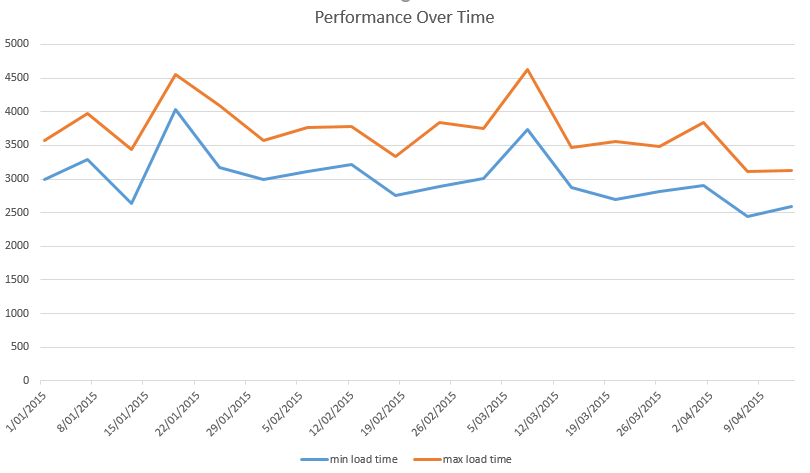
As content changes and networks evolve, the performance of your site will fluctuate. By establishing a baseline and tracking performance over time, you can identify when your site deviates from the norm. Alerts can be set up to notify administrators if performance goes outside acceptable limits.
Resolving Site Performance Problems
Many people mistakenly attempt to fix website speed issues by increasing server performance, which is often the last step in resolving slow load times. Simple fixes can significantly improve your site's speed.
Check what the browser thinks.
All browsers now have built-in tools to measure page load speed. Chrome is the best browser for checking page load speed and all you need to do is hit F12 and load the developer toolbar. Click on the network menu item in the developer toolbar and refresh the website. This will give you a nice waterfall graph of time to load for all page elements. Generally, poor website performance is caused by bloated scripts, large images or large JavaScript files.
Image File Sizes
Most performance enhancement work we do is about optimising images. We often find images of over 500KB on pages which can easily be resized and optimised. It is not uncommon to change a 300KB image file down to 60KB or less with no discernible loss of quality.JavaScript Contention
Even fast websites load JavaScript files sequentially. If you have many JavaScript files, this can slow down the process. To speed things up, use a Content Delivery Network (CDN) to load scripts simultaneously across multiple domains. If a CDN is not feasible, consider splitting the load by creating a new domain record for your JavaScript files.
Minify and Gzip Your Scripts
Minifying your JavaScript and CSS files by removing unnecessary whitespace can reduce file size. Additionally, applying Gzip compression can further shrink file sizes and improve loading times.For example:
- CSS Original Size: 35,667 bytes to Minified: 26,537 bytes (25.6% reduction)
- JS Original Size: 83,505 bytes to Minified: 64,515 bytes (22.7% reduction)
Key Recommendations for Improving Load Speed
Over our 15 years in the industry, we have identified key actions that can drastically improve your website's performance:
- Reduce website bloat by minimising unnecessary components and modules.
- Limit external feeds and streamline website content.
- Optimise images by resizing and compressing them.
- Audit and optimise your code for faster transactions.
- Use a global CDN and content caching to speed up delivery and reduce bandwidth usage.
- Ensure your server supports automatic failover to guarantee high availability and accelerate disaster recovery.
Need Help With Website Performance?
If you lack the internal resources to conduct a full website audit, don't worry! Our team of experts is here to help. Contact us today for professional assistance in optimising your site's performance.Share this post
Subscribe to get exclusive content
Connect with Us
Are you ready to partner with a team committed to turning your business challenges into opportunities? Let’s build something extraordinary together!